
How to Download Your Photos
Once your gallery is ready, getting your photos is simple. Here's how to download from your private online gallery, and from your Google Drive backup, whether you want a single favourite or the whole set.
Downloading From Your Online Gallery
You'll receive an email with a link to your private, password protected gallery.
- Open the link and enter your password to view your gallery
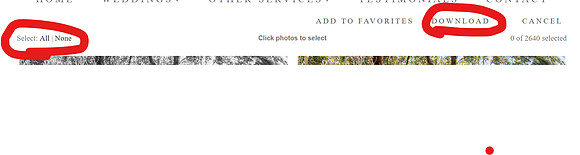
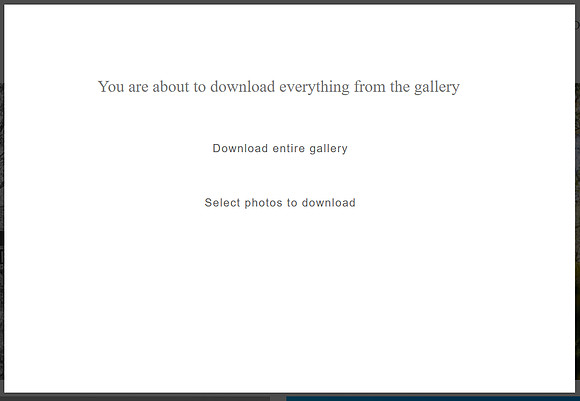
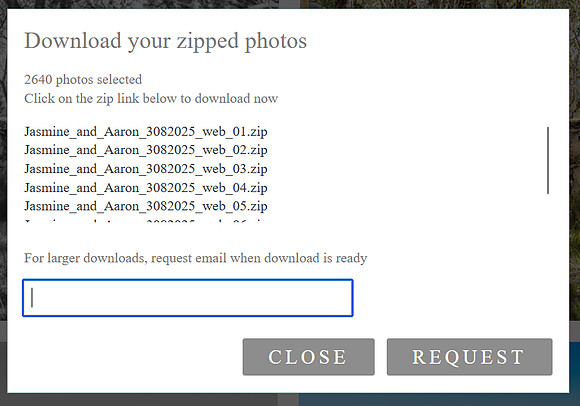
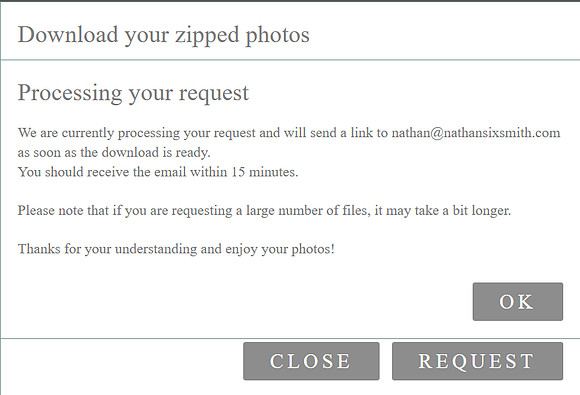
- To download everything at once, click select photos, click all, download entire gallery, give it a moment or click on download again. It will then come up with a pop up requesting for your email address while it generate some zip files. This can take some time depending on how big the gallery is.
Given the number of high resolution images, downloading the full gallery is best done on wifi rather than mobile data.


Downloading From Google Drive
Your gallery is also backed up to Google Drive.
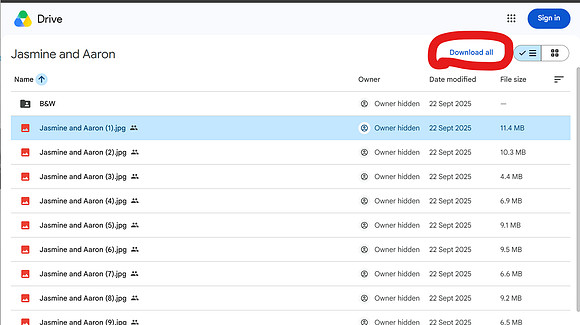
- Open the folder link from your delivery email
- To download everything, there is a "Download all" on the right hand side. This is generate some zip files and will start downloading once they are generated.
This can take some time depending on how big the gallery is. - To grab a single photo, right click that image and select Download
A Few Things to Keep in Mind
Your Zenfolio gallery is archived after 14 months, and your Google Drive backup is removed after 1 year, so it's worth downloading and backing up your photos well before then rather than leaving it too long. All packages include full printing rights, so once downloaded you're free to print your photos anywhere you like.
If you run into any trouble accessing or downloading your gallery, get in touch and I'll sort it out for you.
Running into trouble with your gallery? Get in touch and I'll sort it out for you.
Contact Me I'll get back to you within 24 hours